
Gameplay/Visual Features
Legacy4J introduces several fundamental gameplay and in-game visual changes to match the experience provided by the Legacy Console Edition.
Legacy Crafting and Creative Menus
The Crafting System and Creative Inventory as of the latest versions of LCE has been fully implemented.
By default, this is limited to the tabs used in LCE, but can be extended (without a resource pack) using:
Operator Items Tab- Same as vanilla, adds a tab with operator items such as the Command Block, Light blocks and Barrier blocks.Mod Crafting Tabs- Adds tabs with recipes provided by external modsDisplay Vanilla Tabs- Adds tabs from the vanilla Recipe Book or Creative InventorySearch Creative Tab- Adds a search tab to the Creative Inventory
To navigate between these, use Shift+Left Arrow/Right Arrow or the Right Stick on your gamepad.
To extend these menus further using resource packs, refer to Listing-Based Manager
Resource Albums
Resource pack profiles that can function similarly to the LCE Texture Packs.
For more information, see Resource Pack Management
Host Options
If you are the host of a world, regardless of whether of not Host Privileges is available, you will have access to Host Options.
- This is available by pressing the
Hkey by default, orBackon gamepad, then pressingHost Options - This gives you access to various gamerules, common options and various mixins
- If
Host Privilegesis enabled, you will also have access to more gamerules, as well as time and weather control.
LCE-style Mipmaps and Block Rotations
Using FactoryAPI, distant textures are scaled with Nearest Neighbor scaling, and random block rotations can be toggled.
These options combine to give the game a bit of that iconic look!
By default, Random Block Rotations is disabled, and Nearest Mipmap Scaling is enabled.
You can find these under Advanced Graphics options, and can also be found in the FactoryAPI mod options.
Comparison
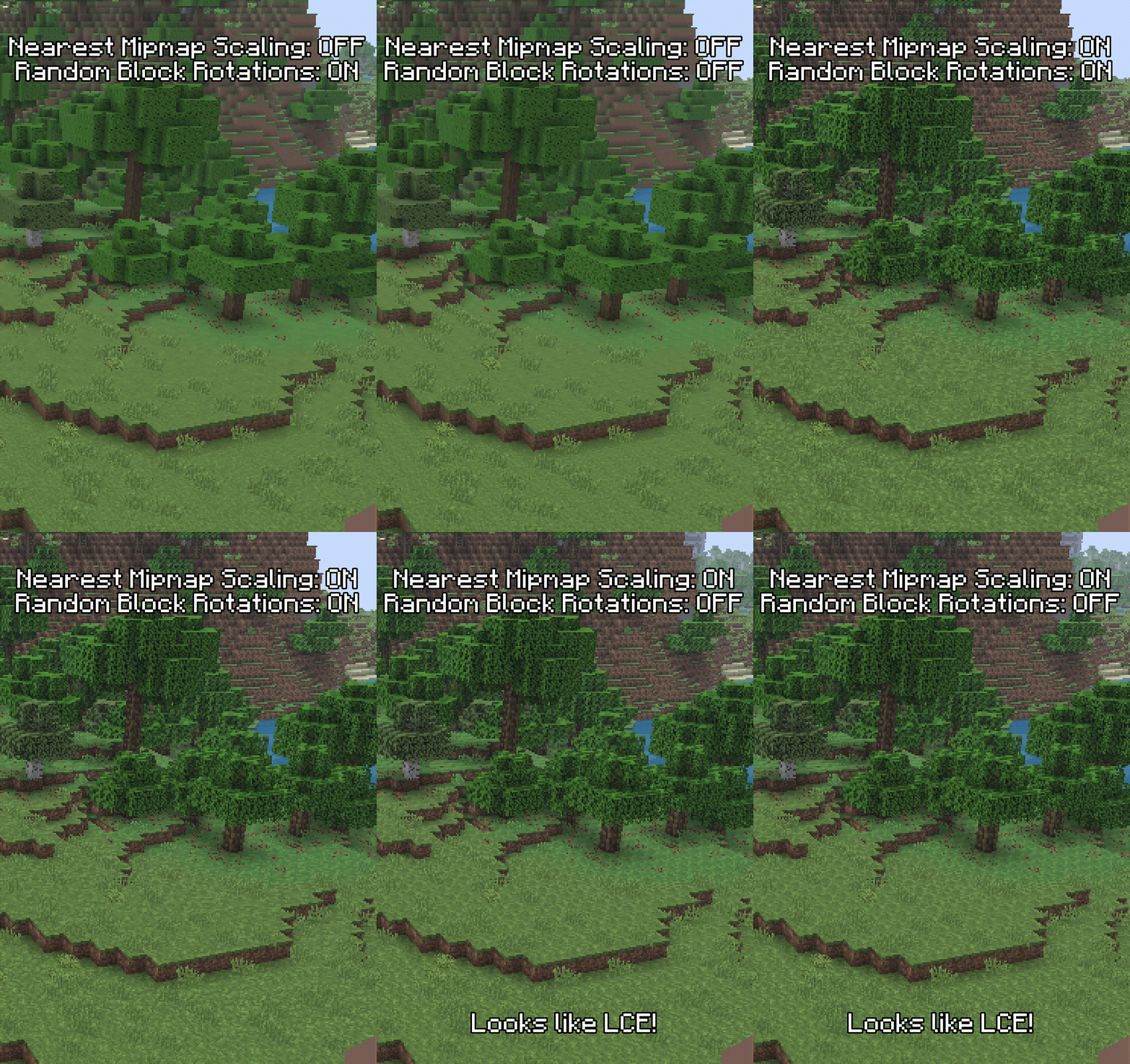
Legacy4J Options
Options applied through the config/legacy/client_options.json, available in Advanced Game Options
Save Cache
Save Cache is used to add the manual saving functionality seen in Xbox One and PlayStation 4 Editions of LCE.
This means that autosaving can be toggled off in the Pause Menu, or by setting the Autosave Interval to OFF.
Unless Fake Autosave Screen (Advanced User Interface) is enabled, this is done without interruption, like in vanilla Java Edition.
This can be disabled by:
- Toggling the
Save Cacheoption inAdvanced Game Options - Joining a multiplayer server
- Playing a world created in Hardcore Mode
Save Cache - Troubleshooting
If you have Save Cache enabled and a world in your saves directory looks corrupted, check the currentWorld folder in case a copy of the world is still there. If so, copy it back to the saves directory.
Legacy Creative Block Placing
Creative block placement from LCE has been implemented. This allows block placement to match your flight speed.
Legacy4J Common Options
Options applied through the config/legacy/common.json, available in Advanced Game Options, or Host Options when in-game
Legacy Combat
Legacy Combat enables the combat system used prior to Java Edition's Combat Update, and currently used on Bedrock Edition.
- This changes how many of the attributes are displayed to visually match LCE:
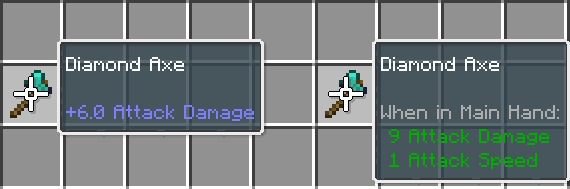
- Damage values have been reduced to match either LCE or Bedrock
- Sweep attacks are still available, but requires any level of the Sweeping Edge enchantment This is controlled by the
legacyCombatcommon option,
Legacy Sword Blocking
Legacy Sword Blocking enables the sword blocking mechanic available prior to Java Edition's Combat Update.
- This can be toggled separately from Legacy Combat, meaning you can have sword blocking with modern combat
- Like other item actions, the off-hand has priority, so using a shield, for example, is still possible if held in the off-hand
Squared View Distance
Squared View Distance allows chunks on the edge of Render Distance to render in a square shape, rather than a circle.
Gamerules
These gamerules can be toggled and adjusted in Existing World/Create New World > More Options > Game Options or in Host Options
Legacy Flight
The Creative flight from LCE has been fully implemented.
- Flying no longer maintains momentum, so you can stop much faster
- Sprint flight is much faster than in vanilla
- Non-sprint flight is 8-directional, making alignment during building much easier
- Slow flying is 4-directional This is controlled by the
legacyFlightgamerule.
Legacy Swimming
Swimming from Update Aquatic and newer versions of LCE have been implemented.
- Swimming can be invoked when looking below the horizon line
- Swimming can be invoked in water of any height
- Swimming up with the Jump button is faster
- There is a barrier at the water's surface that keeps the player swimming, rather than having the player stop swimming when at the surface
- Friction at the water's surface is lessened This is controlled by the
legacySwimminggamerule.
TNT Limit
The tntLimit gamerule can be used to limit the amount of Primed TNT entites that can exist in a world.
This is controlled with an integer value, and defaults to 20
Starter Map
starterMap controls whether or not new players will spawn with an Empty Map.
This is controlled by a boolean, and defaults to true
Starter Bundle
starterBundle controls whether or not new players will spawn with a Bundle item.
This is controlled by a boolean, and defaults to false